Backend
The backend of the application is the core that powers its functionality. It is responsible for managing business logic, handling database operations, and rendering HTML pages that users interact with. In this Python-Django-based project, the backend architecture follows the Model-View-Template (MVT) design pattern, a robust and intuitive framework for building dynamic web applications.
Backend Stack
The following backend technologies were used in the development of this application:
- Python
- Django
- SQLite (database)
Architecture
How MVT works
The MVT model is central to Django’s backend operations.
- Model: Represents the data layer, defining the structure of your database and providing a Pythonic interface for querying and managing data.
- View: Acts as the intermediary between the
Modeland theTemplate. It processes requests, fetches the necessary data, and sends it to the Template. - Template: Handles the presentation layer, rendering the dynamic data from the
Viewinto HTML for the user interface. - URLs: Route requests to the appropriate views.
By following this structured pattern, the Django backend ensures clarity, scalability, and ease of collaboration among developers.
MVT Workflow in the Canteen App
The model is defined and implemented through the following processes within the application:
- User Interaction: A user interacts with the frontend, such as clicking a button to submit a meal request.
- HTTP Request: This action sends an HTTP request to the Django server.
- URL Routing: Django's URL dispatcher routes the request to the appropriate view function based on the URL pattern.
- View Processing: The view function executes, performing tasks such as validating input, querying the database via the
Model, and preparing data for theTemplate. - Template Rendering: The
Viewpasses data to aTemplate, which renders the HTML content with dynamic data. - HTTP Response: The rendered HTML is sent back to the user's browser as an HTTP response, displaying the requested page or result.
These processes are linked as shown in this diagram :
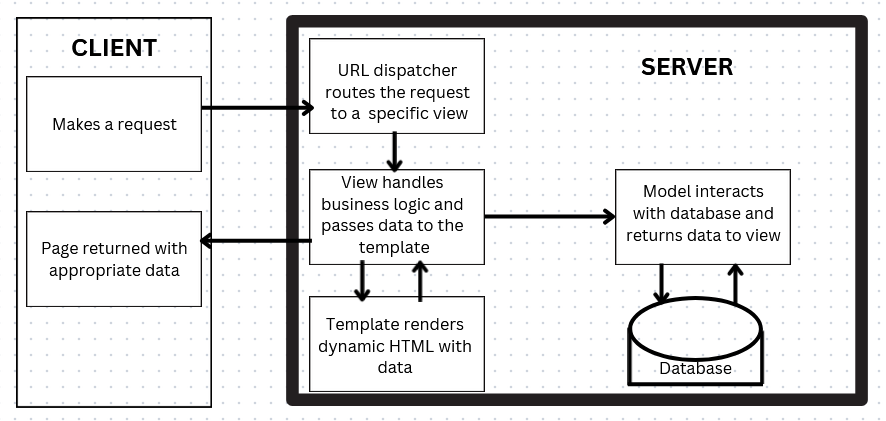
Sample MVT Workflow Example
- When you click on the About link on the Navigation Menu, the server sends an HTTP request to the server.
<a href="{% url 'about' %}" class="nav-item nav-link">About</a>
- Django's URL dispatcher (defined in urls.py) matches the incoming request to a specific URL pattern.
- When the URL pattern matches a request, the corresponding view function is triggered. If not, Django returns a 404 Not Found response.
from django.urls import path
from . import views

urlpatterns = [
    path('about', views.about, name="about"),
]
- The about view function processes the logic by:
- Interacting with the model to fetch or manipulate data.
- Preparing the data for the template.
def about(request):
  return render(request,'main/about.html')
In this example, there is no dynamic data or context variable passed to the template so it returns a static template of about.html.
This is a simple example that doesn't involve fetching dynamic data from the Model. We'll get to see more complex instances of the View functions interacting with the Models and Templates in this section.
Database Schema and Management
The database is managed using Django's Object Relational Mapping (ORM), with SQLite as the default database engine.
Entities and their Relationships
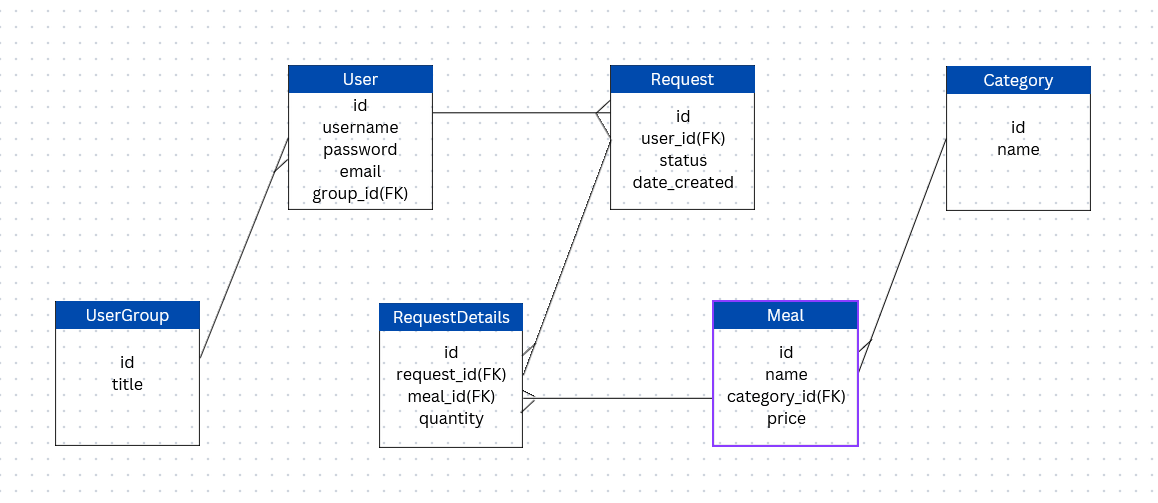
The database consists of six (6) entities namely: User, Meal, UserGroup, Category, Request and RequestDetails.
- User
- Attributes: id, username, password, email, group_id
- Relationships:
- UserGroup: Each User belongs to a UserGroup. This is represented by the group_id in the
Usertable, which is a foreign key referencing theUserGrouptable. - Request: A User can make multiple Requests. This is represented by the user_id in the
Requesttable, which is a foreign key referencing theUsertable.
- UserGroup: Each User belongs to a UserGroup. This is represented by the group_id in the
- UserGroup
- Attributes: id, title
- Relationships:
- User: A UserGroup can have multiple Users. This is a one-to-many relationship where the
Usertable references theUserGrouptable.
- User: A UserGroup can have multiple Users. This is a one-to-many relationship where the
- Meal
- Attributes: id, name, category_id, price
- Relationships:
- Category: Each Meal belongs to a Category. This is represented by the category_id in the
Mealtable, which is a foreign key referencing theCategorytable. - RequestDetails: A Meal can be part of multiple RequestDetails. This is represented by the meal_id in the
RequestDetailstable, which is a foreign key referencing theMealtable.
- Category: Each Meal belongs to a Category. This is represented by the category_id in the
- Category
- Attributes: id, name
- Relationships:
- Meal: A Category can have multiple Meals. This is a one-to-many relationship where the
Mealtable references theCategorytable.
- Meal: A Category can have multiple Meals. This is a one-to-many relationship where the
- Request
- Attributes: id, user_id, status, date_created
- Relationships:
- User: Each Request is made by a User. This is represented by the user_id in the
Requesttable, which is a foreign key referencing theUsertable. - RequestDetails: A Request can have multiple RequestDetails. This is a one-to-many relationship where the
RequestDetailstable references theRequesttable.
- User: Each Request is made by a User. This is represented by the user_id in the
- RequestDetails
- Attributes: id, request_id, meal_id, quantity
- Relationships:
- Request: Each RequestDetails entry is associated with a Request. This is represented by the request_id in the
RequestDetailstable, which is a foreign key referencing theRequesttable. - Meal: Each RequestDetails entry includes a Meal. This is represented by the meal_id in the
RequestDetailstable, which is a foreign key referencing theMealtable.
- Request: Each RequestDetails entry is associated with a Request. This is represented by the request_id in the
Entity Relationship Diagram
This is the diagrammatic representation of the key entities and their relationships.